
ImageGPTImageGPT

Table to Excel

Image to Excel

Photograph a table and download it as a spreadsheet with the same rows and columns.

I

Retyping a table from paper is slow and error-prone. Upload a photo instead: the AI model reads every cell, keeps the rows and columns and gives you an XLSX or CSV file. Tables filled in by hand work too.

A page costs 1 credit. If the photo has several tables, each one gets its own sheet in the Excel file.
II

Real results

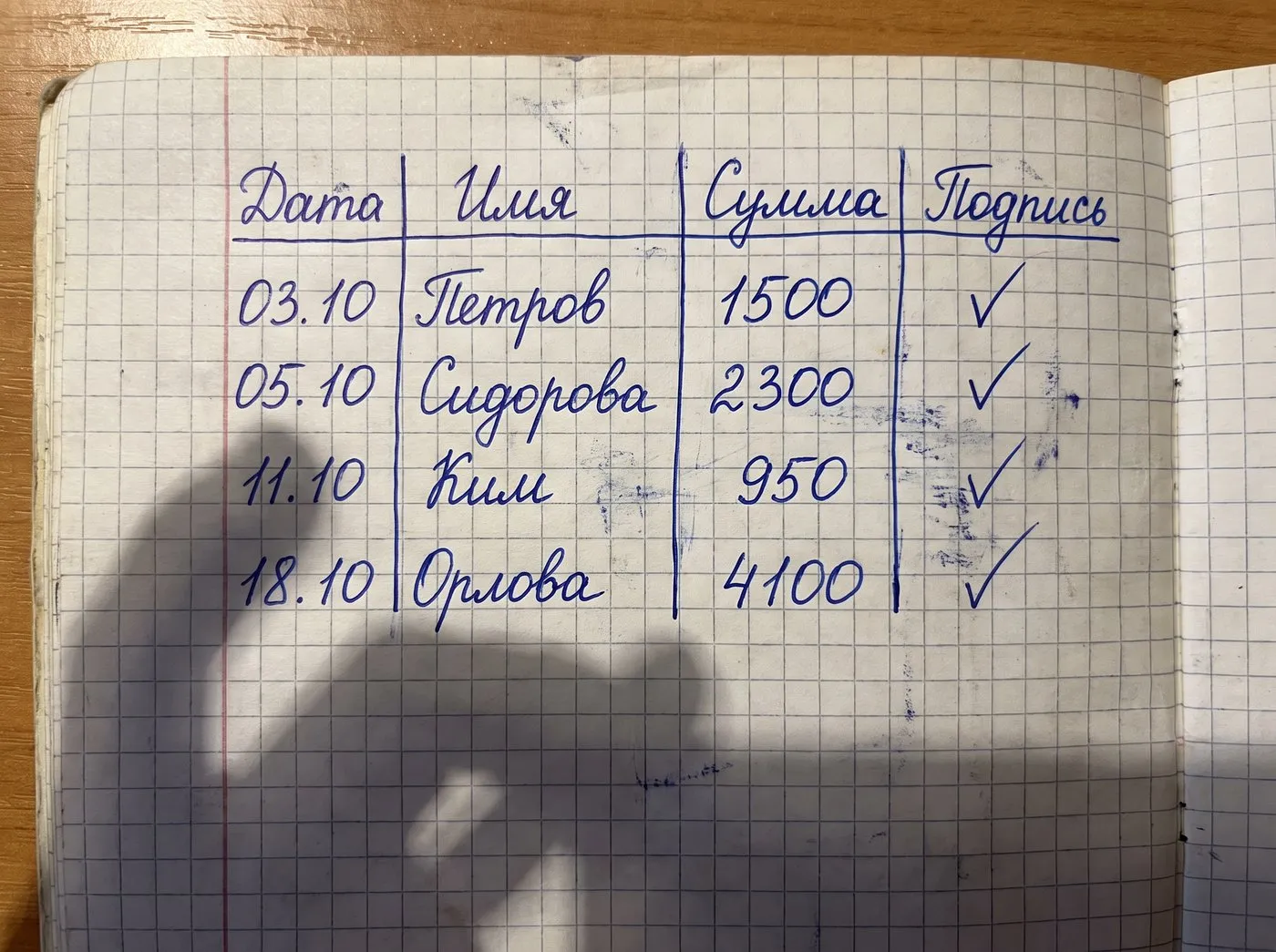
Photo of a handwritten table with dates, names and amounts
| Date | Name | Amount | Signature |
| 03.10 | Petrov | 1500 | ✓ |
| 05.10 | Sidorova | 2300 | ✓ |
| 11.10 | Kim | 950 | ✓ |
| 18.10 | Orlova | 4100 | ✓ |
A handwritten table (in Russian) read in AI mode and ready to download as Excel; the column names translated to English with the built-in translator. The photo was generated with AI.

III

How it works

  1. 01

    Photograph the table

    Straight from above, with every row and column visible.

  2. 02

    Recognise

    AI mode is on: 1 credit a page.

  3. 03

    Download

    Excel saves an XLSX; CSV works with Google Sheets, Numbers and anything else.

IV

Good to know

Printed or handwritten

Forms, ledgers, tables from books and hand-filled sheets.

Several tables

Each table becomes its own sheet.

Free mode won't do

It reads line by line and loses the columns. Tables need AI mode.

V

FAQ

How do I convert a picture of a table to Excel?+

Upload the photo, press Recognise, then Excel. You get an XLSX file with the same layout.

Are merged cells kept?+

No: the table comes as a plain grid and merged cells are split. Formatting and colours aren't carried over.

Can I open it in Google Sheets?+

Yes — import the XLSX or the CSV.