
ImageGPTImageGPT

Signature from a photo

Transparent signature from a photo

Photograph your signature on paper and get a clean signature without the paper or the shadows.

I

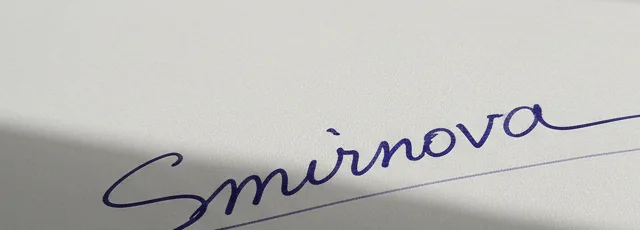
Sign a sheet of white paper and take a photo with your phone. The tool evens out the lighting, separates the ink from the paper and makes the background transparent — even with a shadow falling across the page.

Keep the ink colour from the photo or switch it to black, blue or navy. If thin strokes disappear or specks remain, the Sensitivity slider fixes it.

II

Real results

Photo of a blue pen signature on paper with a shadowBefore
The same signature on a transparent backgroundAfter
A signature on shaded paper → a signature on a transparent background. The photo was generated with AI.

III

How it works

  1. 01

    Photograph your signature

    Close up on white paper, without the pen or other objects in the frame.

  2. 02

    Upload the photo

    Paper and shadows go automatically. Adjust the sensitivity if needed.

  3. 03

    Download PNG or SVG

    Then place it on your document or scan.

IV

Good to know

Shadows are fine

The tool estimates how bright the paper is at every point, so you don't need perfect light.

Frame it tight

Anything dark in the photo counts as ink, so keep other objects out of the shot.

Your photos stay on your device

Everything runs in your browser: nothing is uploaded, so it's fast and safe for personal photos and documents.

V

FAQ

Which pen works best?+

A dark gel or ballpoint pen. Very faint, thin lines are harder to separate from the paper.

Can I change the colour?+

Yes: black, blue, navy, or as in the photo.

Is the photo uploaded?+

No, it's processed in your browser.